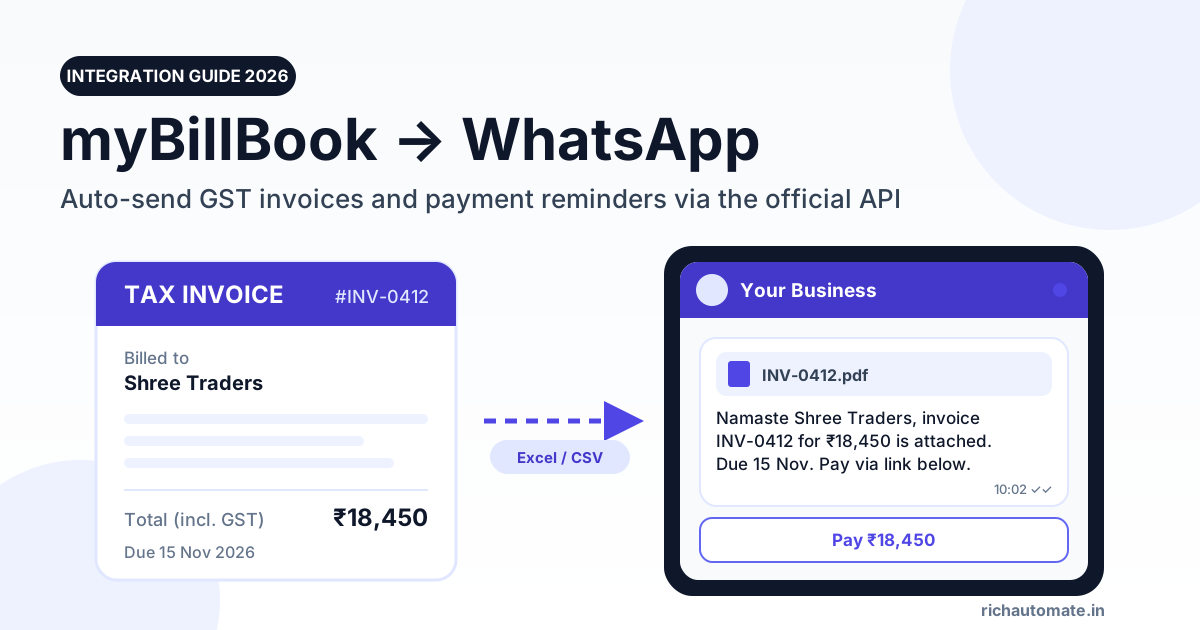
myBillBook lets you share an invoice on WhatsApp and send a one-click payment reminder, but you press send yourself for every customer, through your own WhatsApp. To send GST invoices and payment reminders automatically, export your unpaid invoices from myBillBook to Excel or CSV and send them as approved utility templates through the official WhatsApp Business API, at roughly ₹0.215 per message all-in.
This guide is for traders, distributors and retailers who already bill in myBillBook and now spend an hour a day forwarding PDFs and chasing dues. We checked what myBillBook offers today, where it stops, and how to set up a working invoice-and-reminder pipeline. We also work through the rupee cost of running it.
What myBillBook offers on WhatsApp today
We went through myBillBook's own help centre and pricing page in November 2026. Here is what the product does, in its own words, and what it does not do.
1. Share an invoice on WhatsApp
From any invoice, open the Share dropdown and choose WhatsApp. myBillBook's help article says this works on both web and mobile, and that a QR code or link may appear to complete the action. You can also download the invoice as a PDF or image and attach it yourself. Either way, it is one invoice, one chat, one tap on send.
2. One-click WhatsApp payment reminder (web only)
On the web version, the Party List shows a WhatsApp icon next to each outstanding balance, and Party Details has a Send Reminder button. Clicking either opens WhatsApp Web with a pre-filled message showing the pending amount. myBillBook's own page is clear: "the message is not sent automatically." You review it and press send.
3. Scheduled reminders go by SMS, not WhatsApp
Reminder Settings let you schedule sales-invoice reminders three days before the due date or on the due date. According to myBillBook's payment-reminders page, these customer reminders are sent through SMS. The WhatsApp alerts it mentions are for you, the business owner, about your own payments and business activity.
4. WhatsApp marketing on the Pro plan
The Pro plan lists "SMS + WhatsApp marketing (500 messages/Year)". The business marketing page describes templates, customer selection and campaign reports. It does not say whether this runs on the official WhatsApp Business API, and 500 messages a year covers about 1.5 messages a day.
5. No public API or webhooks
We found no public myBillBook API, developer documentation, webhooks or Zapier app. myBillBook's own site summary for AI tools (llms.txt) lists no integrations. Some search results point to "Billbooks" on Zapier, which is a different product. What myBillBook does offer is report downloads: its help centre says you can download or email reports as PDF or Excel from the mobile app, and Pro lists bulk download and bulk print of invoices.
myBillBook's current plans, as listed on its pricing page:
- Plus: ₹3,490/year (shown as ₹291/month, billed annually). No WhatsApp marketing listed. Invoice share and the web reminder are general features.
- Pro: ₹3,990/year (shown as ₹333/month, billed annually). Adds SMS + WhatsApp marketing (500 messages/year) and bulk download and print of invoices.
- Pro Max: from ₹570/month, billed annually. Adds e-invoicing, Tally data export on request, and 3 users + 1 CA.
Prices and features as listed on myBillBook's site, checked November 2026. The pricing page does not say whether GST is included, and other myBillBook pages show different figures, so confirm on their site before you buy.
Why manual sharing breaks at around 50 invoices a month
Manual share is fine when you raise five bills a day and know every customer. It starts to hurt once you have a few hundred parties and a credit cycle of 15 to 45 days.
- Your time. Each share or reminder takes 20 to 40 seconds: open the party, click, wait for WhatsApp Web, check the text, send. At 1,200 messages a month that is 7 to 13 hours of clicking.
- Your personal number. Messages go from whatever WhatsApp is logged in on that browser. If a staff member leaves, the customer history leaves with that phone.
- No follow-up rhythm. A reminder goes when someone remembers to send it. There is no rule like "remind on the due date, then 7 days after".
- No record. You cannot pull a report of who received, read or ignored a reminder.
- Bulk risk. Pasting the same text to 200 people from a regular WhatsApp or WhatsApp Business app is what gets numbers reported and restricted.
The official WhatsApp Business API, run by Meta's Cloud API, fixes the structural problems. You get a verified business number, pre-approved templates, scheduled sends, delivery and read reports, and a shared inbox for your team.
Manual share vs WhatsApp Business API: side by side
| What you need | myBillBook manual share | WhatsApp Business API (e.g. RichAutomate) |
|---|---|---|
| Who presses send | You, once per customer | Scheduled broadcast or API call |
| Sending number | Whichever phone is logged in | Your verified business number, shared across staff |
| Bulk reminders | One at a time on web; scheduled ones go by SMS | One CSV upload to thousands of parties, with name, amount and due date filled in for each |
| PDF invoice attached | Download and attach, or share link | Document-header template with the PDF |
| Delivery and read status | Only what you see in your chat | Per-message delivery and read reports |
| Customer replies | Land on one person's phone | Shared team inbox, keyword auto-replies |
| Opt-out handling | Manual | Built-in opt-out handling |
| Cost | Included in your myBillBook plan | Meta's per-message rate plus a platform fee |
Three realistic routes from myBillBook to WhatsApp
Because myBillBook has no public API, any automation starts from data you take out of myBillBook. Here are the options, in order of effort.
Route 1: Keep manual share for the few that need it
For a walk-in retail counter or a handful of key accounts, Share → WhatsApp is enough. Use it for one-off bills and keep it.
Route 2: Export to Excel or CSV, then send a template broadcast
This is the route most myBillBook users should take. Once or twice a week:
- Download the sales or party report you need from myBillBook as Excel. Reports can be downloaded or emailed as Excel from the app, and Pro adds bulk invoice download.
- In Excel, keep one row per unpaid invoice: party name, mobile with country code (91XXXXXXXXXX), invoice number, amount, due date and a payment link (your UPI or payment-gateway link).
- Upload the sheet to your WhatsApp API platform and map each column to a template variable.
- Schedule the send. Every customer gets a message from your business number, with their own name, invoice and amount filled in.
If your report does not include every column you need, add the missing ones (such as the payment link) in Excel before upload. It is a 10-minute job with one sheet.
Route 3: A script on your side, using the platform API
If you have a developer, they can read your weekly export (or a Google Sheet your accountant maintains) and call RichAutomate's REST API to send each invoice. Each call can carry its own PDF on a document-header template. Webhooks then report delivery and replies back to your sheet or system. This is a bridge you own. It does not connect live to myBillBook, because myBillBook does not offer that today.
We cover similar setups for other billing tools in our guides to Vyapar WhatsApp invoice reminders and Tally WhatsApp integration.
Template examples with variables
Every business-initiated message on the API must use a template that Meta has approved. Invoices and payment reminders to existing customers are usually approved as utility templates, which cost far less than marketing. Keep them factual. If you add a discount or an offer, Meta may treat the template as marketing.
Get the India 2026 WhatsApp BSP price comparison
Wati vs AiSensy vs Interakt vs RichAutomate: Meta rates, platform fees and hidden costs, side by side. We send it to your WhatsApp in a minute.
| Use | Category | Template body (variables in double braces) |
|---|---|---|
| New invoice (PDF header) | Utility | Namaste {{1}}, your invoice {{2}} for ₹{{3}} dated {{4}} is attached. Due date: {{5}}. Pay here: {{6}} |
| Reminder before due date | Utility | Hi {{1}}, a reminder that invoice {{2}} for ₹{{3}} is due on {{4}}. Pay via {{5}}. Reply PAID if already settled. |
| Overdue reminder | Utility | Hi {{1}}, invoice {{2}} for ₹{{3}} was due on {{4}} and is still open. Please pay via {{5}} or reply to talk to our accounts team. |
| Payment received | Utility | Thank you {{1}}. We have received ₹{{2}} against invoice {{3}}. Your updated balance is ₹{{4}}. |
| Festive offer | Marketing | Hi {{1}}, Diwali stock is in. Order before {{2}} and get {{3}}. Reply ORDER to place an order. |
Add a keyword auto-reply so that "PAID" sends the customer a short "Thanks, our team will confirm" and alerts your accounts person in the shared inbox. Questions like "send ledger" can go to a person, or you can map them in the visual chatbot flow builder.
Try it on your own data: start a 14-day free trial of RichAutomate. No card is needed, setup is ₹0, and you get 100 free credits to send your first invoice and reminder templates.
What it costs: a worked example in rupees
RichAutomate uses Client Pay: you pay a platform fee of ₹0.10 per message, and Meta bills its own charges directly to your business card. Meta's current India rates are ₹0.115 per utility message and ₹0.8631 per marketing message.
Take a distributor who raises 400 invoices a month and sends two reminders for each, so 800 reminders. All 1,200 messages are utility.
| Line item | Calculation | Monthly cost |
|---|---|---|
| Meta utility charges | 1,200 × ₹0.115 | ₹138.00 |
| RichAutomate platform fee | 1,200 × ₹0.10 | ₹120.00 |
| Total, before any plan | ₹138 + ₹120 | ₹258.00 |
| Larger distributor: 2,000 invoices + 3,000 reminders | 5,000 × (₹0.115 + ₹0.10) | ₹1,075.00 |
| One festive offer to 1,000 customers (marketing) | 1,000 × (₹0.8631 + ₹0.10) | ₹963.10 |
Two points stand out. Invoice and reminder traffic is cheap: ₹258 a month for 1,200 messages, or about 21.5 paise each. Marketing is about four times the cost per message, so send offers to fewer, well-chosen parties.
Customer replies also help. Replies you send inside the 24-hour customer service window, after a customer messages you, are not charged by Meta. When a customer replies "send the ledger", your answer within 24 hours usually costs only the platform fee.
Plans are optional. Starter is ₹499/month, Pro ₹899/month, White-label ₹1,199/month (all GST-inclusive), and Custom is on contract. Pay-as-you-go also works. Compare options on RichAutomate pricing, or put your own volumes into the WhatsApp API cost calculator.
Step-by-step setup
- Pick the number. Use a number that is not currently active on the WhatsApp app, or plan to move it. Many businesses use a fresh SIM for billing so the owner's personal chats stay separate.
- Sign up and connect. Create a RichAutomate account and connect your number to the official Meta Cloud API through the guided signup. Keep your business details (GST or MSME registration, website) ready for Meta's business verification.
- Add a payment method in Meta. On Client Pay, Meta charges your card directly for its message fees.
- Create four templates. New invoice (with PDF header), before-due reminder, overdue reminder and payment received. Submit them as utility and wait for approval, which is often quick for clean, factual text.
- Prepare the sheet. Export from myBillBook to Excel, clean the mobile numbers into 91XXXXXXXXXX format, remove parties who have not agreed to WhatsApp updates, and add the payment-link column.
- Test on your own number. Send each template to yourself and one staff member first. Check that amounts, dates and links come through correctly.
- Schedule the rhythm. For example, send new invoices daily, a reminder three days before the due date, and an overdue reminder seven days after. Reuse the same sheet with a filter on due date.
- Route the replies. Give the accounts team access to the shared inbox, and set keyword auto-replies for PAID, LEDGER and STOP.
- Close the loop in myBillBook. When a payment lands, record it in myBillBook as you do today, so next week's export only shows open invoices.
For GST-specific details such as invoice numbering, e-invoice IRN and what to show in the message, see our guide to GST invoice automation on WhatsApp.
Opt-in, the DPDP Act 2023 and opt-outs
Automation makes it easy to message hundreds of people. Do it only for customers who expect to hear from you on WhatsApp.
- Get WhatsApp opt-in. Meta requires that people agree to receive messages from your business on WhatsApp before you start a conversation. Collect it at onboarding: a line on your credit application or order form, a tick-box on your website, or a customer's own "yes, send bills on WhatsApp" reply. Note the date and source.
- DPDP Act 2023 basics. India's Digital Personal Data Protection Act, 2023 expects consent to be free, specific, informed and clear, given for a stated purpose. It also expects that consent can be withdrawn as easily as it was given. Use customer numbers for the purpose you collected them for, such as billing, and keep the data with access limited to staff who need it. Check your specific obligations with your CA or legal adviser.
- Make stopping easy. Add "Reply STOP to stop WhatsApp updates" to your templates. RichAutomate's opt-out handling stops future broadcasts to anyone who opts out.
- Quality rating. Meta tracks how customers react to your messages. Blocks and reports lower your quality rating and can limit how many people you can message. No provider can promise you will never face restrictions. What protects your number is opt-in, relevant content and sensible frequency.
Common mistakes to avoid
- Mixing an offer into a reminder. "Pay now and get 2% off your next order" can push a utility template into marketing pricing and review.
- Uploading the full party list. Filter to parties with open invoices and opt-in. Messaging dormant parties brings blocks.
- Bad numbers. Landlines, missing country codes and duplicate rows waste messages. Clean them in Excel first.
- Reminders after payment. Update myBillBook before each export so paid parties drop out.
- Daily reminders. Two or three reminders per invoice cycle is plenty for most B2B buyers.
Retailers on Gofrugal POS can compare the native route in our Gofrugal WhatsApp integration guide, which covers GoAlerts pricing and reply limits.
Billing on Swipe in another branch? Our guide to Swipe invoice WhatsApp automation shows the same webhook-to-template pattern with Swipe's API.
Getting started
myBillBook is good at billing, GST and stock. Its WhatsApp features are built for one-to-one sharing that you send by hand. If you send a few hundred invoices and reminders a month, a weekly Excel export plus approved utility templates on the official WhatsApp Business API turns that hour of clicking into a scheduled job. In our worked example it costs about ₹258 a month for 1,200 messages.
Create your free RichAutomate account to connect your number, get your invoice and reminder templates approved, and send your first myBillBook export as a broadcast. The trial lasts 14 days, needs no card, has ₹0 setup and includes 100 free credits.