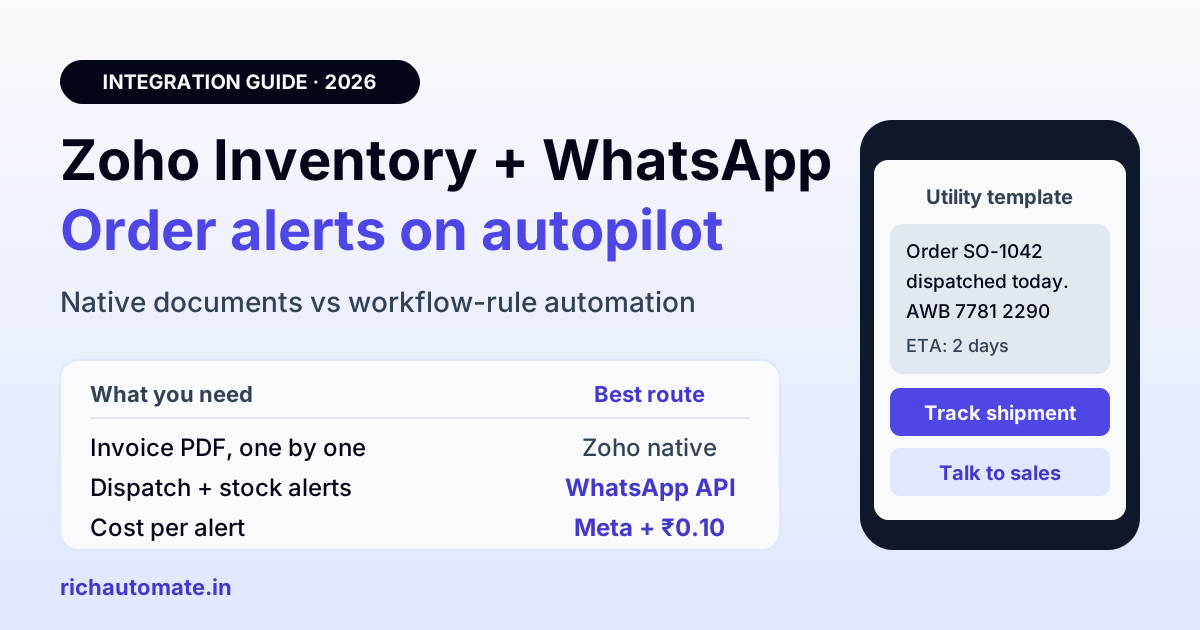
Zoho Inventory has a built-in WhatsApp integration. It sends invoices, sales orders, payment receipts, credit notes and customer statements from your own WhatsApp Business number, but you pay for each send with Zoho credits and a person triggers it from the transaction screen. For automatic order confirmations, dispatch updates, backorder notices and stock alerts, connect Zoho Inventory's workflow rules or webhooks to a WhatsApp API platform. On RichAutomate that costs Meta's published rate plus ₹0.10 per message, from ₹0 a month.
This guide is for Indian distributors, D2C brands, wholesalers and multi-warehouse retailers who already run their stock on Zoho Inventory. It covers what the native integration really covers, where it stops, how to automate the gaps, and what each option costs per order in rupees, so you can pick a setup before you spend on credits.
What Zoho Inventory's native WhatsApp integration does
The integration sits under Settings > Integrations & Marketplace > WhatsApp. You connect a WhatsApp Business account through a verified Facebook Business Manager and register a mobile number. Zoho's help page warns that this number must not already be running personal WhatsApp. If it is, you have to move it or use a fresh number.
Once connected, you create message templates per module. Each template has a name, a category (Utility or Marketing), a language and placeholders, and invoice templates can carry the PDF as an attachment. WhatsApp reviews every template, and Zoho says approval can take up to 24 hours. Templates can be cloned and one can be marked as the default for each module.
Zoho's help documentation lists these transaction types for WhatsApp:
| Transaction | Template | Send from Zoho Inventory | Typical use in India |
|---|---|---|---|
| Invoice | Yes | Yes, with PDF | GST invoice to a dealer or retailer |
| Sales order | Yes | Yes | Order confirmation to a B2B buyer |
| Payment receipt | Yes | Yes, on save | Payment received acknowledgement |
| Retainer invoice | Yes | Yes | Advance payment request |
| Credit note | Yes | Yes | Return or rate-difference adjustment |
| Customer statement | Yes | Yes | Month-end outstanding statement |
| Estimate, sales receipt | Yes | Template only in the help steps | Quotation, counter sale |
You also enable WhatsApp per customer under Sales > Customers, either for all contact persons or for specific ones. Each customer phone number has to start with the country code, so a ten-digit number saved as 98XXXXXXXX will fail until you add +91.
Where the native integration stops
The native integration is a good fit if you send a few dozen documents a day and someone already opens each transaction. It is a weaker fit once order volume grows, for four reasons.
- Sends are manual. Zoho's help steps send a message when a user clicks Send on a transaction or saves a new one with a contact selected. The help page does not describe sends that trigger on their own when an order changes status.
- No shipment or stock events. The template list covers customer documents. Package shipped, out for delivery, backordered, back in stock and low-stock alerts are not in the list, and in an inventory business those are the messages customers actually ask about.
- Credits on top of Meta. You have to buy Zoho's IM (Instant Messaging) credits before you can send. The help page has a "Calculate Price" step but does not publish a per-message rupee rate, so check the credit price in your own account before you commit volume.
- No shared inbox or chatbot. Replies from customers still need somewhere to land. A dealer who answers "send me 20 more cartons" needs a person or a flow to pick that up.
None of this makes the native option bad. It makes it the right tool for documents and the wrong tool for event-driven alerts.
The automated route: workflow rules, webhooks and a WhatsApp API
Zoho Inventory includes workflow rules, webhooks and custom functions written in Deluge, Zoho's scripting language. Check which of these your edition includes before you plan around them. A workflow rule watches a module such as Sales Orders, Packages or Shipments. When a record is created or a field changes, it fires an action, and that action can call a webhook URL or run a custom function.
That is all you need to make WhatsApp automatic. The pattern looks like this:
- Trigger in Zoho Inventory. For example, "Shipment status changes to Shipped" or "Sales order is created".
- Webhook or Deluge function. It sends the customer's phone number, name, order number, tracking number and amount to your WhatsApp platform.
- Approved template on the WhatsApp Business API. The platform fills the placeholders and sends from your verified number.
- Replies land in a shared inbox. Your sales or dispatch team, or a simple chatbot flow, handles them.
On RichAutomate the receiving side is the developer API, authenticated with an API key from your dashboard. If you would rather not write a Deluge function, connector tools such as Pipedream and Onlizer list Zoho Inventory triggers and can forward them to any HTTP endpoint. Either way the rule is the same: one Zoho event becomes one WhatsApp template.
Which messages to automate first
Start with the events that create "where is my order?" calls. In most Indian distribution and D2C businesses these four cover most of the inbound phone load:
Get the India 2026 WhatsApp BSP price comparison
Wati vs AiSensy vs Interakt vs RichAutomate: Meta rates, platform fees and hidden costs, side by side. We send it to your WhatsApp in a minute.
| Zoho Inventory event | WhatsApp template | Meta category | Button |
|---|---|---|---|
| Sales order created | Order confirmed, items and expected dispatch date | Utility | View order |
| Package shipped | Dispatched with courier name and AWB number | Utility | Track shipment |
| Item backordered | Part of your order is delayed, new date | Utility | Accept or cancel |
| Invoice overdue | Payment reminder with amount due | Utility | Pay by UPI |
| Item back in stock | Restock alert to customers who asked | Marketing | Order now |
If your shipping already runs through Shiprocket, keep tracking updates there and use Zoho only for order and invoice events. Our Shiprocket WhatsApp order tracking guide shows how to avoid sending the same dispatch alert twice. For prepaid-heavy D2C brands with cash on delivery orders, add a COD confirmation step before the package is created. The WhatsApp COD confirmation guide explains how to cut RTO with one button.
Internal alerts are worth automating too. A low-stock workflow can message your purchase manager on WhatsApp the moment an item crosses its reorder level. That message goes to your own staff, not a customer, so it costs the same template rate and needs the same opt-in, just from your team.
What it costs: Zoho plan plus WhatsApp per message
Your WhatsApp bill has two parts: the Zoho Inventory plan you already pay for, and the per-message cost of whichever WhatsApp route you use. Zoho Inventory's India pricing page lists these plans, billed annually and exclusive of GST:
| Zoho Inventory plan (India) | Price per organisation per month | Orders per month |
|---|---|---|
| Free | ₹0 | 50 |
| Standard | ₹999 | 500 |
| Premium | ₹2,299 | 3,000 |
| Plus | ₹4,999 | 7,500 |
| Enterprise | ₹7,499 | 15,000 |
On the WhatsApp side, Meta charges per delivered template. In India a utility template costs about ₹0.115 and a marketing template about ₹0.8631. Utility templates sent while a customer service window is open, meaning within 24 hours of the customer's last message, are free. Free-form replies inside that window are free too.
On RichAutomate's Client Pay model you pay Meta's rate directly plus a ₹0.10 platform fee per message, with plans from ₹0 a month on pay-as-you-go. Here is a worked example. A distributor ships 1,500 orders a month and sends three utility alerts per order: confirmed, dispatched and invoice. That is 4,500 utility templates.
- Meta charges: 4,500 × ₹0.115 = ₹517.50
- RichAutomate fee: 4,500 × ₹0.10 = ₹450
- Total WhatsApp cost: ₹967.50 a month, or about ₹0.215 per message
That works out to about ₹0.65 per order for three updates. This is the worst case. Messages sent while a customer chat is open cost less, and fewer alerts per order cost proportionally less. See the full plan list on the RichAutomate pricing page.
Native integration vs API: which one fits you
The decision usually comes down to volume and how much of the work you want a person to do.
- Stay native if you send fewer than 30 to 40 documents a day, the same person creates and sends each invoice, and your customers mostly need the PDF.
- Move to the API if you ship hundreds of orders a month, want dispatch and backorder alerts without anyone clicking Send, need replies to land in a shared team inbox, or want to reuse the same number for broadcasts and a chatbot.
- Run both if your accounts team likes sending statements from Zoho by hand. Meta allows a number to be registered with only one platform at a time, though, so in that case use separate numbers for documents and alerts.
If you also use Zoho Books for accounting, the invoicing side overlaps. Our Zoho Books WhatsApp integration guide covers invoice and payment-reminder automation, and the Zoho CRM WhatsApp integration guide covers the lead side. Inventory events (orders, packages, shipments and stock) are the part that belongs here.
Setting it up in a week
- Day 1: clean phone numbers. Export your Zoho Inventory customers, add +91 to every Indian number and fix the bad ones. A wrong number is a failed send you still have to investigate.
- Day 1 to 2: record opt-in. Meta requires customers to agree to receive WhatsApp messages before you message them first. Add a WhatsApp consent line to your order form, dealer onboarding sheet or checkout.
- Day 2: submit templates. Write four utility templates for the events in the table above. Keep them factual, with no offers, so they stay in the utility category.
- Day 3 to 4: build workflow rules. One rule per event in Zoho Inventory, each calling a webhook or Deluge function that posts to the RichAutomate API.
- Day 5: test on your own number. Create a dummy sales order, ship it and confirm each template arrives with the right placeholders filled.
- Day 6 to 7: go live and watch replies. Assign the shared inbox to your dispatch team and track how many "where is my order?" calls drop in the first two weeks.
Compliance points Indian businesses miss
Three issues come up again and again with Indian inventory setups. First, going live on the WhatsApp Business API needs business verification, and on RichAutomate that means a GST certificate or MSME (Udyam) registration in your business name. You can trial without it. Second, keep one template per purpose. Do not slip a discount into a dispatch alert, because Meta can reclassify the template as marketing and the rate jumps from about ₹0.115 to about ₹0.86. Third, respect quiet hours for B2B dealers. A backorder alert at 11 pm reads as spam even when it is technically a utility message.
Getting started
Zoho Inventory already knows when an order is confirmed, packed, shipped or stuck. WhatsApp is how your customers want to hear about it. Keep the native integration for one-off documents, and let workflow rules and the WhatsApp API handle every status alert automatically. Create your free RichAutomate account, submit your first utility template today, and connect your first Zoho Inventory workflow rule this week.