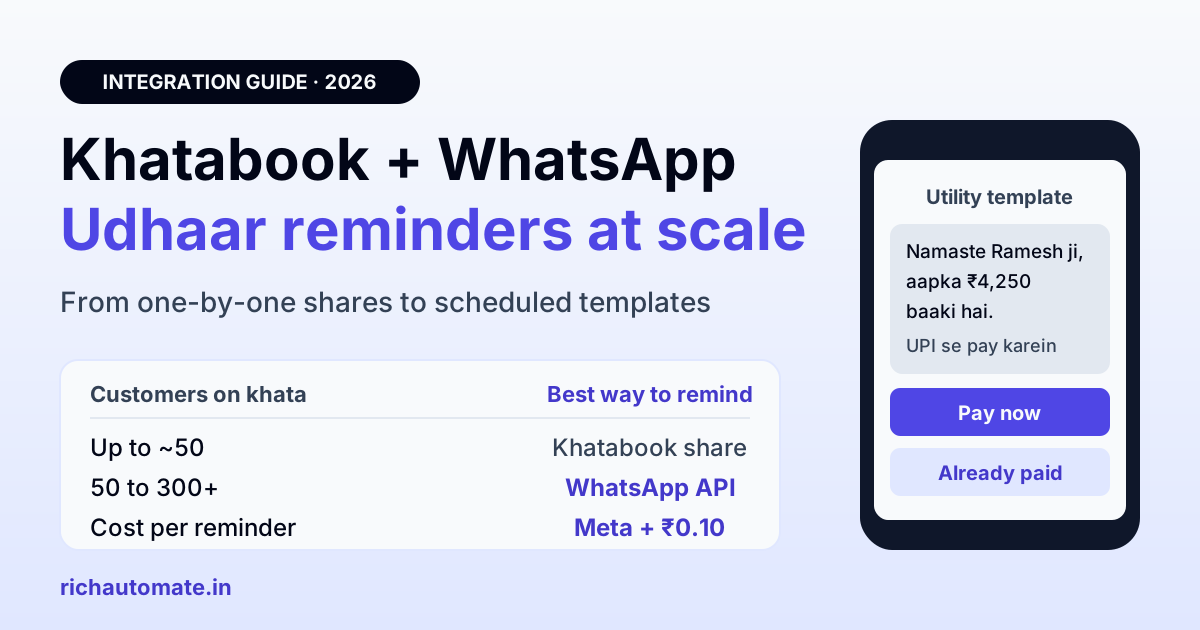
Khatabook can send payment reminders on WhatsApp, but each one goes out as a shared link from your own phone, and Khatabook does not publish a public developer API you can plug into the WhatsApp Business API. To send udhaar reminders at scale, export your customer balances from Khatabook, upload them to a WhatsApp API platform and send Meta-approved utility templates with a UPI payment button, which on RichAutomate costs Meta's published rate plus ₹0.10 per message, from ₹0 a month.
Picture a wholesale kirana supplier in Indore with 340 customers on khata. On the first Sunday of the month the owner sits down to send reminders. Open Khatabook, pick a customer, tap remind, choose WhatsApp, WhatsApp opens, tap send, go back. Repeat. By customer forty the tea is cold, by customer ninety it is dinner time, and the remaining 250 shops get a reminder next week, or never. Nobody can tell who read the message, who paid, and who needs a second nudge.
That is not a Khatabook problem. Khatabook does exactly what it was built to do: keep a clean digital ledger for millions of small businesses. The problem is that reminders sent by hand from one phone stop working once the list gets long. This guide explains what Khatabook offers for reminders today, why there is no direct "Khatabook API to WhatsApp" connection, and the practical bridge Indian SMBs use instead.
What Khatabook offers for payment reminders today
Khatabook is one of India's most used digital ledger apps. Its about page says it reached 5 crore registered merchants across 12 languages, and its Android app, published by Khatabook - Business, shows about 100 million installs on Play Store trackers. For reminders, these are the features Khatabook describes in its own blog and app listing:
- Reminder date per customer. You can set a due date such as next week, next month or a specific day, and the app helps you send the reminder from your own phone.
- Share via WhatsApp or SMS. The app generates a reminder with a link that you can send over SMS or WhatsApp. The Play Store listing says you can "send multiple reminders with one tap".
- Collect payments. The listing says merchants can accept payments through UPI, cards and wallets, and Khatabook offers a free QR code that customers scan to pay.
- Reports. Khatabook lets you generate customer and transaction reports as a PDF that you can download, print or share.
Khatabook also owns Biz Analyst, a Tally companion app it acquired in March 2021 in a deal reported at $10 million. Biz Analyst has its own auto-reminder feature over SMS, WhatsApp and email, billed in coins, but it works on Tally data, not on your Khatabook ledger.
For a shop with 20 or 30 regular credit customers, the free Khatabook flow is honestly enough. The friction starts when the list grows.
Is there a Khatabook API for WhatsApp integration?
No, not a public one. Khatabook does not publish a developer portal, API documentation, SDK or partner integration program on khatabook.com, and API directories such as API Evangelist list it as a consumer and SMB mobile app rather than a developer platform.
That matters because every "Khatabook WhatsApp integration" that promises live, automatic sync is either reading data you exported by hand, or scraping the app, which is fragile and risky for your account. Be wary of any tool that asks for your Khatabook login. The honest options are:
- Export and upload. Pull your customer list and balances out of Khatabook, then upload them to a WhatsApp API platform as a contact list with balance fields. This is the bridge most small businesses should use, and it is covered step by step below.
- Move billing to a tool with an API or a native WhatsApp connection. If you raise GST invoices, apps such as Vyapar or Tally make it easier to automate. Our guides to Vyapar WhatsApp invoice reminders and Tally WhatsApp integration walk through both.
Personal WhatsApp vs WhatsApp Business API for udhaar reminders
When you share a reminder from any app to WhatsApp, it is sent from the WhatsApp on your phone, under your own number, one chat at a time. The WhatsApp Business API works differently: messages go out from your business number through an approved provider, in bulk, on a schedule, with status tracking for each customer.
| Factor | Khatabook reminder shared to WhatsApp | WhatsApp Business API |
|---|---|---|
| Who sends it | You, from your phone, chat by chat | Your business number, through a platform |
| Practical volume | Fine for 20 to 50 customers | Hundreds or thousands in one scheduled run |
| Scheduling and follow-ups | Manual every time on WhatsApp | Scheduled sends and automatic second and third reminders |
| Payment button | Link inside the text | Pay-now URL button and quick replies such as "Already paid" |
| Delivery and read status | Only by opening each chat | Sent, delivered and read status per customer in one dashboard |
| Replies | Mixed in with family and friends | Shared team inbox, so staff can answer |
| Cost | Free | Meta's published rate plus the platform fee |
There is also a quieter risk with personal WhatsApp. Forwarding the same message to hundreds of people from a regular WhatsApp account is the kind of behaviour WhatsApp's systems watch for, and a blocked personal number takes your family chats down with it. A business number on the API keeps reminders separate and visible. Bulk sending on the API still has rules, though: customers who did not agree to hear from you can block or report you, and that lowers your number's quality rating. No provider can protect a number that sends unwanted messages.
The bridge: Khatabook data to WhatsApp API reminders in five steps
Here is the workflow we recommend for a Khatabook user with a few hundred credit customers.
- Pull the balances out of Khatabook. Generate the customer balance report from the reports section and download it. If it comes out as a PDF, copy the name, mobile number and amount due into a spreadsheet. Keep three columns at minimum: name, mobile number with 91 in front, and balance due.
- Clean the list. Remove customers with zero balance, fix numbers with missing digits, and mark the ones who have agreed to get WhatsApp messages from you. Only those go into the upload.
- Upload to your WhatsApp API platform. On RichAutomate you import the CSV as contacts, and the balance column becomes a variable you can drop into a template.
- Get one utility template approved. Submit a neutral, factual payment reminder (samples below). Meta usually reviews templates quickly, and a plain reminder tied to an existing balance fits the utility category.
- Schedule the run and the follow-ups. Send the first reminder, then a second one a few days later only to those who have not replied "Already paid" or cleared the balance in your books.
The weak point is step one: the export is manual, so do it on a fixed day each week or month and keep Khatabook as your single record of who owes what. When a customer pays, record it in Khatabook first, then re-export before the next run so nobody who has paid gets chased.
Send these messages on WhatsApp, from your own number
We get your templates approved on the official WhatsApp API and set up your first broadcast with you. ₹0 platform fee, you pay only Meta's per-message rate.
Opt-in and template category: the two rules you cannot skip
Opt-in. Meta's WhatsApp Business policy requires that customers agree to receive messages from your business on WhatsApp before you message them first. For a shop, that can be as simple as asking at the counter, "Kya hum aapko WhatsApp par hisaab aur payment reminder bhej sakte hain?", and ticking a column in your sheet. A QR code at the counter that opens a WhatsApp chat with your business number also works, because the customer starts the conversation.
Template category. Meta sorts templates into marketing, utility and authentication. Meta's own categorisation guide lists a billing reminder as a utility example, and a payment reminder for a real, existing balance belongs there too. Utility is far cheaper than marketing in India, so keep the reminder plain. Do not add "Diwali offer", discounts or new-stock news to the same template, because promotional wording can get it reclassified as marketing. Send offers as a separate marketing template to customers who opted in to promotions.
Here is a sample utility template in Hinglish. Variables in double braces are filled from your uploaded sheet:
Namaste {{1}} ji, {{2}} ke khate mein aapka ₹{{3}} baaki hai (aakhri entry: {{4}}). Neeche "Pay now" button se UPI ke through payment kar sakte hain. Agar payment ho chuka hai to "Already paid" dabaiye, hum hisaab update kar denge. Dhanyavaad.
And the same reminder in English:
Hello {{1}}, your balance with {{2}} is ₹{{3}} as of {{4}}. You can pay by UPI using the "Pay now" button below. If you have already paid, tap "Already paid" and we will update your account. Thank you.
Add a URL button labelled "Pay now" that points to your UPI or payment-gateway link, plus two quick replies: "Already paid" and "Call me". If you use Razorpay payment links, our Razorpay WhatsApp integration guide shows how to put a unique link per customer into the button.
A reminder schedule that recovers udhaar without annoying people
Credit customers are usually regulars, so the tone matters as much as the timing. A sequence that most shops find polite and effective looks like this:
| When | Message | Who gets it |
|---|---|---|
| 3 days before the due date | Friendly balance reminder with Pay now button | Every opted-in customer with a balance |
| On the due date | Same template, short and neutral | Customers who have not paid or tapped "Already paid" |
| 7 days after the due date | Overdue reminder that offers a call | Customers still unpaid |
| 15 days after the due date | No template; the owner calls personally | The few customers left |
Two habits help. Send between 10 am and 7 pm, when shops are open and people read business messages. And stop the sequence the moment someone replies, so a human answers instead of a fourth automated reminder. For a deeper look at timing and wording for overdue bills, see our guide to WhatsApp payment reminders for overdue invoices.
What udhaar reminders on WhatsApp API actually cost
On RichAutomate Client Pay you pay Meta directly at Meta's published rate and RichAutomate adds a platform fee of ₹0.10 per message, with plans from ₹0 a month on pay-as-you-go. Meta's published rate for India is about ₹0.115 for a utility template and ₹0.8631 for a marketing template. Two Meta changes from 1 October 2026 are worth knowing: utility templates are now charged even when sent inside an open 24-hour chat window, and each business number gets 1,000 free service messages a month before Meta charges for replies.
Here is a monthly estimate for the Indore supplier with 340 credit customers, of whom 300 have opted in:
| Step | Messages | Rate per message | Monthly cost |
|---|---|---|---|
| Reminder 3 days before due date | 300 | ₹0.115 + ₹0.10 | ₹64.50 |
| Due-date reminder to unpaid | 220 | ₹0.115 + ₹0.10 | ₹47.30 |
| Overdue reminder | 150 | ₹0.115 + ₹0.10 | ₹32.25 |
| Your chat replies to customers | 200 | ₹0 Meta (within free 1,000) + ₹0.10 | ₹20.00 |
| Total | 870 | ₹164.05 |
The paid-versus-unpaid counts are an illustration, not a promise of collection rates; your numbers will depend on your customers. The point is the scale of the cost: a few hundred rupees a month to remind every credit customer on time, against an evening of manual sharing that never reaches the whole list. You can check plans and the wallet model on the RichAutomate pricing page.
When to stay on Khatabook alone, and when to add or switch
Not every shop needs the API. A simple way to decide:
- Under about 50 credit customers: stay with Khatabook's free reminders. The manual flow is quick enough and costs nothing.
- 50 to a few hundred customers, ledger-only business: keep Khatabook as your ledger and add a WhatsApp API platform with the export bridge above. You get bulk scheduling, a Pay now button, read status and a team inbox without changing how you record entries.
- GST invoicing, distributors or multiple staff: consider moving billing to software with a stronger WhatsApp workflow, such as Vyapar or Tally, so invoices and reminders come from the same data without a weekly export.
- Online collections at scale: generate payment links per customer through a gateway such as Razorpay, so each reminder carries a link that reconciles itself when paid.
Whichever route you choose, the rules are the same: opted-in customers only, a plain utility template for the reminder, and a human who answers when a customer replies.
Getting started
You can try RichAutomate without paperwork and stay on pay-as-you-go at ₹0 a month. To go live on your own business number you need a GST certificate or MSME (Udyam) registration in your business name for Meta verification. Export this month's Khatabook balances, get one utility reminder template approved, and run your first scheduled batch. Create your free RichAutomate account and send your first udhaar reminders this week.