To connect BUSY to WhatsApp, either switch on BUSY's own WhatsApp option, which sends an invoice PDF link through WhatsApp on your office PC, or move BUSY data such as invoices and outstanding bills into a WhatsApp Business API platform through an export, Google Sheets or a connector. The built-in option suits a few invoices a day; the API route suits reminders, bulk sends and delivery tracking at distributor scale.
BUSY is one of the most widely used GST accounting and inventory packages among Indian traders, distributors and wholesalers. It is built by Busy Infotech, which IndiaMART bought outright in 2022 for ₹500 crore. A pharma distributor in Indore, a hosiery wholesaler in Ludhiana or a textile trader in Surat might run billing, stock and receivables on it for years. Sooner or later the same question comes up: can BUSY send invoices and payment reminders on WhatsApp automatically, without a staff member forwarding each PDF?
This guide covers what BUSY offers on its own, the three realistic ways to connect it to the official WhatsApp Business API, which messages to automate first, the template and opt-in rules, what it costs per month, and a rollout checklist. Everything about BUSY here comes from busy.in as checked in November 2026. Where BUSY does not publish something, we say so, and you should confirm it with your BUSY partner.
What BUSY offers for WhatsApp today
BUSY currently lists four desktop editions on its website: Start, Smart, Power and Power+. It also offers a BUSY Mobile app for reports, quotations, orders and invoices on the phone, and BUSY On Cloud for remote access to the desktop software. As checked November 2026, busy.in shows Start from ₹5,000 a year, Smart from ₹8,000 a year and Power from ₹12,000 a year for a single user, with GST extra; Power+ has no listed price.
WhatsApp sharing is built in, but it works differently from the official API. According to BUSY's own FAQs and its WhatsApp billing page:
- Setup sits under SMS settings. You go to Administration, then Configuration, then SMS API Configuration, and create a WhatsApp format with mobile number and message parameters.
- It runs through WhatsApp on your computer. BUSY's setup steps ask you to install WhatsApp on Windows and scan the QR code. When you send, WhatsApp Desktop opens with the message ready.
- The customer gets a link. BUSY shares the invoice as a link to the PDF rather than attaching the file, and the customer does not need BUSY to open it.
- It can trigger on save. In voucher series configuration you can enable sending after the voucher is saved, using the party's mobile number from the Account Master.
- Payment reminders exist too. BUSY's Print/Email/SMS menu has a Payment Reminder report under Outstanding Analysis, which can be sent by SMS or the WhatsApp format.
For a shop sending 10 to 20 bills a day, this is often enough. The limits show up at volume. The message goes from whichever WhatsApp number is logged in on that PC, so there are no approved templates, no delivery or read webhooks back to your system, no shared team inbox, and no route to a verified green tick. Sending many similar messages from a regular WhatsApp number is also the pattern most likely to get the number restricted. BUSY's pages do not describe bulk WhatsApp campaigns or per-message charges, so ask your BUSY partner what your version supports.
Built-in BUSY WhatsApp vs the WhatsApp Business API
The official WhatsApp Business API, which platforms like RichAutomate provide, is a different channel. Messages go out from a business number registered with Meta, using templates Meta has approved, and every message returns sent, delivered, read or failed statuses. Here is how the two compare for a BUSY user.
| Need | BUSY built-in WhatsApp | WhatsApp Business API |
|---|---|---|
| Sending number | The WhatsApp account logged in on the office PC | A business number registered on Meta's API |
| Message format | Free text with an invoice PDF link | Meta-approved templates with variables, PDF attachments and buttons |
| Bulk or scheduled sends | Not described by BUSY | Yes, with campaign scheduling |
| Delivery and read tracking | Visible only on that phone or PC | Status webhooks for every message |
| Team replies | One device | Shared inbox for several staff |
| Green tick | Not available | Eligible to apply |
| Cost | No per-message fee published by BUSY | Meta charge per template plus a platform fee |
Many businesses run both: BUSY's own option for the occasional one-off share, and the API for anything repeated, bulk or time-sensitive.
Three realistic ways to connect BUSY to the API
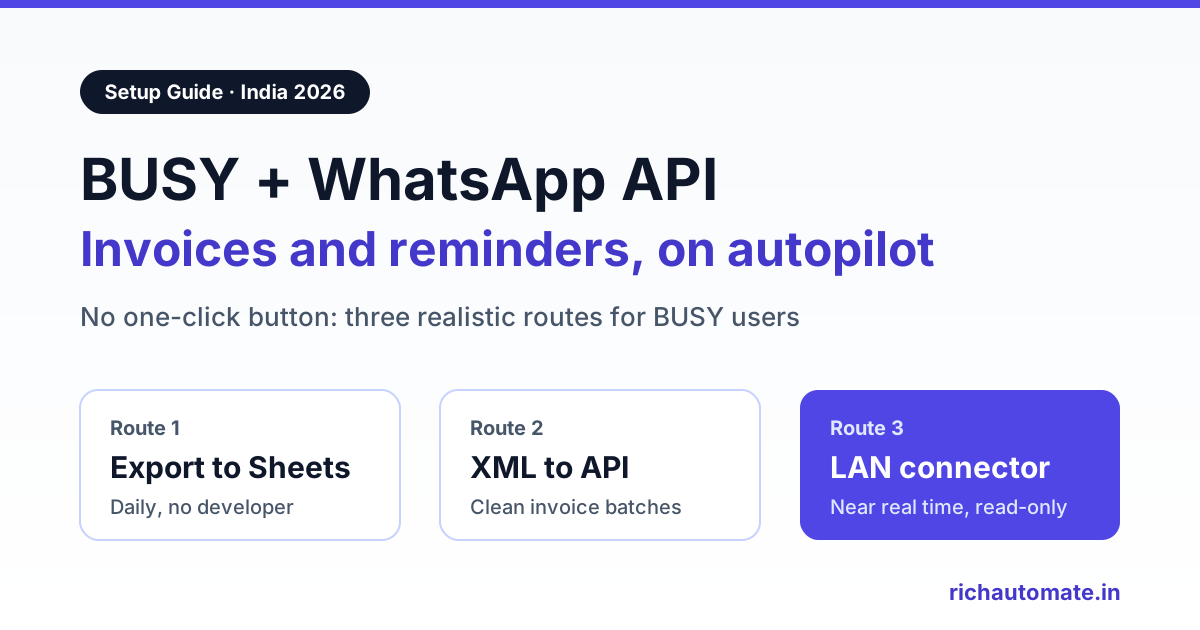
There is no official one-click BUSY button for the WhatsApp Business API, and RichAutomate does not have a native BUSY connector. What RichAutomate does provide is the API layer: a developer API and webhooks, Google Sheets, and compatibility with automation tools such as Make, Zapier and n8n. Your BUSY data reaches it in one of three ways.
Route 1: export from BUSY, then automate the rest
BUSY lets you export reports with Alt+E to Excel, CSV, PDF and, per its FAQs, Google Sheets. BUSY does not document a scheduled or automatic export, so this route depends on a daily habit: at a fixed time, someone exports the day's sales register or the pending bills report. If it lands in Google Sheets, RichAutomate can read new rows and send a template to each party. If it lands as an Excel or CSV file in a shared folder, Make, Zapier or n8n can pick it up and call the RichAutomate API. Our Google Sheets WhatsApp integration guide walks through the sheet-to-template mapping.
Route 2: XML data export for structured feeds
BUSY has a Data Export/Import (XML) option under Administration for masters and transactions. BUSY's FAQs say XML export is not available in the most basic edition, so check your edition first. A developer can parse these files into a clean feed of party names, mobile numbers, invoice numbers and amounts, then post it to the RichAutomate developer API. This is more work than a spreadsheet but less fragile than retyping columns.
Route 3: a connector on the office PC or LAN
BUSY does not publish an ODBC driver or a public developer API on busy.in. Some BUSY partners and third-party add-ons offer connectors that run on the office PC or server and read company data directly. If you go this way, confirm with your BUSY partner exactly how the connector reads data, that it is read-only, and that it is supported on your BUSY version. A read-only connector is the closest you will get to real-time, for example sending the invoice within a minute of saving it.
| Route | Setup effort | Speed | Best for |
|---|---|---|---|
| Export to Sheets or Excel | Low, no developer | Daily or twice daily | Payment reminders and statements |
| XML export to API | Medium, needs a developer | As often as you export | Invoice batches with clean data |
| Read-only connector | Medium to high, partner-led | Near real time | Invoice and dispatch alerts at volume |
If you also run Tally or Marg in another branch, the same three-route logic applies. See our Tally WhatsApp integration guide and our Marg ERP WhatsApp setup guide.
Get the India 2026 WhatsApp BSP price comparison
Wati vs AiSensy vs Interakt vs RichAutomate: Meta rates, platform fees and hidden costs, side by side. We send it to your WhatsApp in a minute.
Messages worth automating first
Do not automate everything at once. Start with the messages that either bring money in faster or stop phone calls. Each one needs the right Meta template category, because category decides both approval and price.
- Invoice PDF after billing. "Dear {party}, your invoice {number} for ₹{amount} dated {date} is attached." A utility template with a document header. This replaces the manual forward from BUSY.
- Payment reminders by ageing bucket. Group pending bills into 0 to 30, 31 to 60 and 60-plus days, and send a firmer wording to each bucket. Keep these as utility templates: plain facts about a specific bill, no offers. Add a "Pay now" link or your UPI ID, and a button to request the ledger.
- Order confirmation and dispatch. Confirm the order, then send dispatch details with the transporter name, LR number and expected delivery date. Distributors get far fewer "where is my maal" calls once this is running.
- Ledger statement on request. When a retailer messages "ledger" or "statement", reply with the latest account statement PDF. Because the customer started the conversation, this is a service reply inside the 24-hour window, with no Meta charge.
- Low-stock and reorder alerts to staff. Send a daily utility message to the purchase manager or godown in-charge listing items below reorder level. Staff must opt in like anyone else.
Festive offers, new-scheme announcements and price-list broadcasts are marketing messages. They cost more and need clearer opt-in, so keep them separate from your billing flows.
Template, opt-in and compliance rules
The API is stricter than a phone, and that strictness protects your number. The essentials:
- Opt-in first. Collect WhatsApp consent from each party, for example a line on the order form, a checkbox at onboarding or a "Hi" message to your business number. Store the consent date next to the party.
- Use the right category. Invoice, reminder, dispatch and stock alerts are utility. Anything promotional is marketing. Meta can recategorise a template it thinks is mislabelled, which changes its price.
- Keep mobile numbers clean. BUSY's Account Master is your source. Store numbers with the 91 country code and no spaces, and fix any party with a landline or two numbers in one field.
- Watch quality. Blocks and reports from recipients lower your number's quality rating and can limit how many people you can message. Never send to purchased lists, and make it easy for a party to say stop.
- Business verification. To go live on the WhatsApp Business API in India you need GST registration or MSME/Udyam registration for Meta business verification. You can trial and build templates before that, but live sending at scale needs it.
No provider can promise that a number will never be restricted. What you can do is send only to consenting parties, use honest templates and watch your quality rating every week.
What it costs each month
On RichAutomate's Client Pay plan, you pay a ₹0.10 platform fee per message, and Meta bills its own per-message charges directly to your business. There is a ₹0 pay-as-you-go plan with no monthly minimum. Monthly plans are optional; the Pro plan at ₹899 a month adds the visual flow builder and the developer API, which you will want for the ledger-on-request flow and for routes 2 and 3.
Meta's approximate India rates for 2026, excluding GST, are about ₹0.86 per marketing message, ₹0.115 per utility message and ₹0.115 per authentication message. Customer-initiated service replies carry no Meta charge, and utility templates sent inside an open customer service window are also free from Meta.
Here is a hypothetical Indore distributor billing 600 invoices and sending 400 payment reminders a month, plus answering 200 ledger requests and sending one small festive broadcast:
| Message | Volume | Meta charge | Platform fee | Monthly total |
|---|---|---|---|---|
| Invoice PDFs (utility) | 600 | ₹69 | ₹60 | ₹129 |
| Payment reminders (utility) | 400 | ₹46 | ₹40 | ₹86 |
| Ledger replies (service) | 200 | ₹0 | ₹20 | ₹20 |
| Festive offer (marketing) | 300 | ₹258 | ₹30 | ₹288 |
| Messages total | 1,500 | ₹373 | ₹150 | ₹523 |
| Optional Pro plan | ₹899 | ₹1,422 with Pro |
Meta's charges above exclude GST, and the utility rows assume every template is sent outside an open window, so real bills are often a little lower. Drop the festive broadcast and the billing workflow alone costs about ₹235 a month on pay-as-you-go. To model your own mix, use our WhatsApp Business API cost calculator or see the full RichAutomate pricing page.
Rollout checklist for BUSY users
- Clean the Account Master. Export your party list, fix mobile numbers and mark which parties have given WhatsApp consent.
- Pick your number. Use a number that is not active on the regular WhatsApp app, or plan a migration. Do not use the number already logged in for BUSY's built-in sharing.
- Register and verify. Sign up, connect the number to Meta and complete business verification with GST or Udyam details.
- Submit templates. Start with three utility templates: invoice, payment reminder and dispatch. Keep the wording factual.
- Choose a route. For most BUSY users, route 1 with Google Sheets is the fastest start. Move to XML or a connector once volumes justify a developer.
- Test with ten friendly parties. Check that names, amounts and PDF links match BUSY exactly before you go wider.
- Go live by segment. Turn on invoices first, reminders a week later, then dispatch alerts. Watch delivery rates and replies after each step.
- Review monthly. Compare collections and inbound calls before and after, and retire templates nobody reads.
If your team uses Frappe or ERPNext, follow our ERPNext WhatsApp notification guide to automate invoice and payment alerts.
Comparing billing apps? See how the myBillBook WhatsApp integration works for GST invoices and overdue reminders.
If your retail counters log credit in Khatabook, the Khatabook WhatsApp payment reminder workflow covers export, templates and follow-ups.
Is the API worth it for a BUSY business?
If you bill a handful of invoices a day from one counter, BUSY's built-in WhatsApp share may be all you need. Once you are chasing hundreds of outstanding bills, dispatching to retailers across a state or handling ledger requests from many parties, the API pays for itself in staff time and faster collections, usually for a few hundred rupees a month in message costs. Start with one route and three templates, prove it on a small group, then widen it.
To try it with your own BUSY data and templates, create a free RichAutomate account and begin on the ₹0 pay-as-you-go plan.