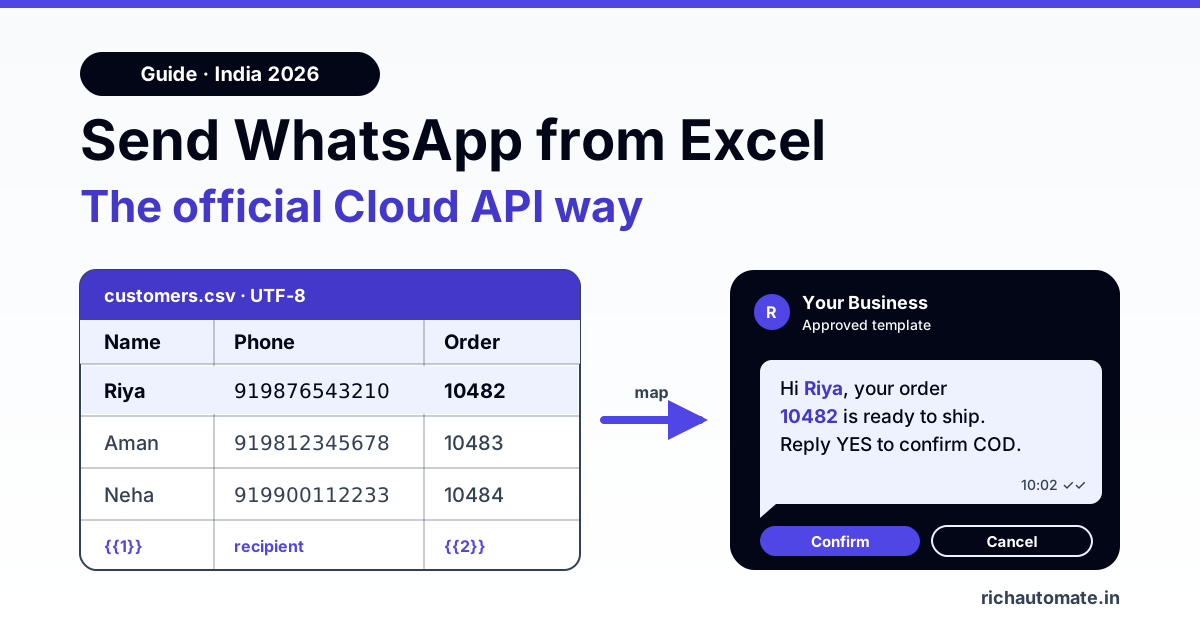
To send WhatsApp messages from Excel the official way, clean your sheet so every row has a 12-digit number starting with 91, a column for each template variable and an opt-in flag, then save it as CSV UTF-8 and upload it to a WhatsApp Business API platform. There you pick a Meta-approved template, map each column to {{1}}, {{2}} and so on, schedule the send, and download a delivery report afterwards. No Chrome extension, no wa.me macro and no personal WhatsApp account involved.
Most "Excel to WhatsApp" tutorials push a browser extension or a VBA macro that opens wa.me links one after another. Both drive WhatsApp Web like a robot, and WhatsApp's automated systems are built to catch that kind of bulk activity on personal and Business App numbers. The official route goes through Meta's Cloud API instead: messages leave from a registered business number, each one uses a template Meta has already reviewed, and every send is logged. It does not make a number unbannable (nothing does), but it is the only method Meta actually permits for business messages at volume.
This guide covers the Excel side in detail: column layout, variable mapping, phone number cleanup, the scientific-notation trap, opt-in tracking, saving as CSV UTF-8 for Hindi or Gujarati text, the upload-to-report flow, a short developer option, and what 1,000 to 20,000 rows actually cost in rupees.
Four ways to send WhatsApp from Excel, compared
Before touching the sheet, pick the method. Here is how the common options stack up for an Indian business sending a few hundred to tens of thousands of messages.
| Method | How it works | Personalisation | Risk to your number | Delivery reports |
|---|---|---|---|---|
| Chrome extension (WhatsApp Web sender) | Reads your sheet and types messages into WhatsApp Web automatically | Basic name merge | High: automated bulk sends from a personal or Business App number are what WhatsApp restricts | Rough, extension-side only |
| wa.me click-to-chat macro (VBA) | Excel builds a wa.me link per row and opens each chat; you or SendKeys press send | Any column, via text formula | High at volume, and slow: one chat window per row | None |
| Official API: CSV upload to a platform | Upload sheet, choose approved template, map columns, schedule | Full variable mapping per row | Lowest of the four, as long as recipients opted in and quality stays good | Sent, delivered, read and failed per row, downloadable |
| Official API: your own code (VBA, Power Automate, script) | Each row triggers a POST to Meta's Cloud API | Full, under your control | Same as above; you handle errors and pacing | Via webhooks you build |
If you are still choosing a tool rather than a method, our roundup of bulk WhatsApp sender software compares the options in more depth, and the guide on how to send bulk WhatsApp messages legally covers consent and the rules in India. The rest of this article assumes the official API route.
Step 1: Lay out the sheet around your template
An approved WhatsApp template is a message with numbered placeholders. A COD confirmation for a D2C brand might read:
Hi {{1}}, your order {{2}} for Rs {{3}} is ready to ship by cash on delivery. Reply YES to confirm or NO to cancel.
Your Excel sheet should have exactly one column per placeholder, plus the phone number and an opt-in column. Keep headers short, in English and without special characters, because they become the field names you pick from during mapping.
| Excel column | Example value | Maps to | Notes |
|---|---|---|---|
| A: Phone | 919876543210 | Recipient | 12 digits, 91 prefix, stored as text |
| B: Name | Riya | {{1}} | First name reads more naturally than full name |
| C: OrderID | ORD-10482 | {{2}} | Paste as text so leading zeros survive |
| D: Amount | 1,299 | {{3}} | Format the way you want it to read in the message |
| E: OptIn | Yes | Filter only | Send only to rows marked Yes |
| F: OptInSource | Checkout checkbox | Record only | Where and when consent was given |
Three rules save most failed sends. First, no blank cells in any mapped column: an empty variable makes Meta reject that message (error 131008, a required parameter is missing), so fill gaps with a sensible default like "there" for a missing name or drop the row. Second, no line breaks or tabs inside a variable cell, and no long runs of spaces, because Meta rejects parameters containing them. Use Find and Replace (Ctrl+H, type Ctrl+J in the Find box) to strip hidden line breaks from pasted addresses. Third, keep variable text short. A variable is meant for a name, an amount or a date, not a paragraph.
If the same template has a media header (an invoice PDF or product image), add one more column holding a public file URL for each row and map it to the header during setup.
Step 2: Fix phone numbers (the part that breaks most uploads)
WhatsApp needs the full international number with no plus sign, no spaces and no leading zero. For India that is 91 followed by the 10-digit mobile number, 12 digits in total. Customer data rarely arrives that way. You will see "098765 43210", "+91-98765-43210", "9876543210" and "91 98765 43210" in the same column.
A cleanup formula that handles the usual mess
Put the raw number in column A and this in a new column:
="91"&RIGHT(SUBSTITUTE(SUBSTITUTE(SUBSTITUTE(SUBSTITUTE(A2," ",""),"-",""),"+",""),"(",""),10)It removes spaces, hyphens, plus signs and brackets, keeps the last 10 digits (which drops any leading 0 or existing 91), then adds 91 back. Next to it, add =LEN(B2)=12 and filter for FALSE to find numbers that were too short. Landline numbers will pass the length check but cannot receive WhatsApp, so sort them out by source if your list mixes both.
The 9.18E+11 scientific-notation trap
Excel stores a 12-digit number like 919876543210 as a number and may display it as 9.19877E+11. That looks cosmetic, but if you open a CSV in Excel, see the scientific format and save again, Excel can write the rounded value back out, and 919876543210 becomes 919877000000. Every row then goes to a wrong or non-existent number. Three fixes:
- Format the phone column as Text (Home, Number Format, Text) before pasting or typing numbers.
- For an existing column, convert with =TEXT(A2,"0") and paste the result back as values.
- Never double-click a CSV to open it if you plan to edit it. Use Data, From Text/CSV, and set the phone column type to Text during import.
Remove duplicates before you pay for them
The same customer often appears twice with different formatting. Clean first, then run Data, Remove Duplicates on the cleaned phone column. If you need to see the duplicates rather than delete them, =COUNTIF($B$2:$B$20000,B2)>1 flags every repeat. Each duplicate is a message you pay for and a customer who gets the same text twice, which is a quick way to collect "block" taps.
Step 3: Keep an opt-in column and actually use it
Meta's business messaging policy requires that people agree to receive WhatsApp messages from you before you message them. In practice, your sheet should show where each number came from: a checkout checkbox, a website form, a "Reply JOIN" message, an admission form with a WhatsApp consent line. Add an OptIn column (Yes or No) and an OptInSource column, then filter to Yes before export.
This matters for more than compliance. WhatsApp tracks how recipients react. If many people block or report your messages, your number's quality rating drops, and a low rating can cap or pause your sending. A clean, opted-in list is the strongest protection you have. It reduces risk; it does not remove it, so keep content relevant and give people an easy way to stop messages.
Step 4: Save as CSV UTF-8 (especially for Hindi and Gujarati)
Most platforms accept CSV, and Excel offers two CSV options that look identical in the Save As menu. Choose CSV UTF-8 (Comma delimited) (*.csv). The plain "CSV (Comma delimited)" option saves in your system's legacy encoding on many Windows installs, which turns Devanagari, Gujarati, Tamil or any non-English text into question marks or garbled characters.
Send these messages on WhatsApp, from your own number
We get your templates approved on the official WhatsApp API and set up your first broadcast with you. ₹0 platform fee, you pay only Meta's per-message rate.
Quick checks before upload:
- Open the saved CSV in Notepad (not Excel). Hindi names should read correctly and phone numbers should show all 12 digits.
- Delete empty trailing rows and columns. Stray formatting far below your data can create blank rows.
- Commas inside values (like "1,299" or an address) are fine. Excel wraps those cells in quotes automatically.
- Keep one sheet per file. CSV saves only the active sheet.
If rows go missing after import even though the file looks right, our troubleshooting guide on CSV rows missing after contact import walks through the usual causes. Teams that live in Google Sheets rather than Excel can skip the export step entirely with a Google Sheets WhatsApp integration.
Step 5: Upload, map, schedule and download the report
With a clean CSV and an approved template, the actual send takes a few minutes on any WhatsApp Business API platform. In RichAutomate the flow is:
- Upload the CSV as a campaign audience (or import it to contacts first if you want to reuse the list and tag it).
- Pick the approved template. Only templates Meta has approved show up. If you need a new one, submit it and wait for review before the campaign.
- Map columns to variables. Phone goes to recipient, Name to {{1}}, OrderID to {{2}}, Amount to {{3}}. Check the preview for a few rows, including one with a long name and one with Hindi text.
- Send a test to your own number and read it on a phone, not just in the preview.
- Schedule for a sensible time, for example 10 am to 7 pm, rather than late night, which tends to draw blocks.
- Download the report once the campaign finishes: sent, delivered, read and failed per row, with the failure reason. Feed failed numbers back into your sheet and mark them so they are not retried blindly.
Want to try this with your own sheet? Start a 14-day free trial of RichAutomate, connect your number, and run your first Excel upload with a test template. There is no setup fee.
Messaging limits on a new number
Meta limits how many unique people a business can start conversations with in a rolling 24 hours. The published tiers step up from 250 to 1,000, 10,000, 100,000 and then unlimited, and you move up as you send more with a good quality rating. Meta has been raising starting limits for verified businesses, so your starting tier may be higher, but check the limit shown in your WhatsApp Manager before scheduling a 20,000-row sheet on a fresh number. If your list is larger than your tier, split it into daily batches.
India use cases: what the sheet looks like by business type
The same five-step process covers very different businesses. What changes is the template and the columns.
- Coaching institutes, fee reminders. Columns: Phone (parent), StudentName, Batch, AmountDue, DueDate. Template: "Hi, this is a reminder that the fee of Rs {{3}} for {{1}} ({{2}}) is due on {{4}}." Export the pending-fees list from your fee register each month and upload.
- D2C brands, COD confirmation. Columns: Phone, Name, OrderID, Amount, PaymentMode. Export the day's COD orders from your store, filter to COD, upload twice a day. Adding quick-reply buttons (Confirm or Cancel) to the template lets the replies come back into your inbox.
- CA and tax firms, GST due-date reminders. Columns: Phone, ClientName, GSTIN (last 4 characters), ReturnType, DueDate. For example, a GSTR-3B reminder a few days before the 20th. Keep a separate column for which clients file quarterly versus monthly so one sheet serves both.
- Clinics and diagnostic centres, appointment reminders. Columns: Phone, PatientName, DoctorName, Date, Time, BranchName. Upload the next day's appointment list each evening. Keep medical detail out of variables; the reminder only needs the time and place.
Meta decides each template's category when it reviews it. Reminders tied to an existing order, appointment or account usually fit utility, while anything promotional is marketing. The category changes the price, as the next section shows.
What sending from Excel costs: 1,000 to 20,000 rows
On RichAutomate's Client Pay model you pay a ₹0.10 platform fee per message, and Meta bills its own per-message charge directly to your Meta account. Using Meta's published India rates of roughly ₹0.86 per marketing message and ₹0.115 per utility message, here is what a single campaign costs:
| Rows in sheet | Marketing (₹0.86 + ₹0.10 = ₹0.96 per msg) | Utility (₹0.115 + ₹0.10 = ₹0.215 per msg) |
|---|---|---|
| 1,000 | ₹960 | ₹215 |
| 5,000 | ₹4,800 | ₹1,075 |
| 20,000 | ₹19,200 | ₹4,300 |
| GST | 18% GST applies on top of these figures (for example, ₹19,200 becomes ₹22,656 and ₹4,300 becomes ₹5,074) | |
Two observations. A utility template costs about a fifth of a marketing one per message, so a genuine COD confirmation or fee reminder should be written and submitted as utility, not padded with offers that push it into marketing. And clean data cuts the bill directly: removing 8% duplicates and invalid numbers from a 20,000-row marketing sheet saves about ₹1,500 before GST. Plans start at ₹499 a month; see RichAutomate pricing for what each includes, or model your own volumes with the WhatsApp API cost calculator. Meta revises rates from time to time, so confirm current figures before budgeting a large campaign.
For developers: VBA, Power Automate or a direct API call
If you would rather trigger sends from Excel itself, every option ends in the same place: a POST to Meta's Cloud API messages endpoint, once per row, using an approved template.
- VBA: loop through the rows, build the JSON body with the row's values, and send it with MSXML2.ServerXMLHTTP. Store the access token outside the workbook, and write the returned message ID or error back into a Status column.
- Power Automate: use "List rows present in a table" on an Excel Online table, then an HTTP action per row (a premium connector). Add a delay or concurrency limit so you do not burst past your tier.
- Script or platform API: read the CSV in Python or Node and call either Meta directly or your platform's API.
The request each row produces looks like this (Graph API v24.0, placeholder values):
curl -X POST "https://graph.facebook.com/v24.0/YOUR_PHONE_NUMBER_ID/messages" \
  -H "Authorization: Bearer YOUR_ACCESS_TOKEN" \
  -H "Content-Type: application/json" \
  -d '{
    "messaging_product": "whatsapp",
    "to": "919876543210",
    "type": "template",
    "template": {
      "name": "cod_confirmation",
      "language": { "code": "en" },
      "components": [{
        "type": "body",
        "parameters": [
          { "type": "text", "text": "Riya" },
          { "type": "text", "text": "ORD-10482" },
          { "type": "text", "text": "1,299" }
        ]
      }]
    }
  }'
The parameters array is your Excel row: the first item fills {{1}}, the second {{2}}, and so on, in order. All the Excel hygiene above still applies, because the API rejects blank parameters and malformed numbers just as a CSV upload does. The difference is that with your own code you also have to handle retries, pacing and status webhooks yourself, which is the work a platform upload does for you.
Coaching institutes can use the same Excel upload for fee-due lists. See our coaching fee reminder WhatsApp automation guide for ready utility templates.
Pre-send checklist
- Phone column stored as text, every value 12 digits starting with 91.
- Duplicates removed after cleaning, not before.
- Only opted-in rows kept, with the consent source recorded.
- No blank cells, line breaks or tabs in mapped columns.
- Saved as CSV UTF-8 and checked in Notepad.
- Template approved, category understood, test message read on a real phone.
- Row count within your current messaging tier, or split into batches.
Get these right and sending WhatsApp messages from Excel becomes a routine ten-minute job instead of a gamble with your number. Sign up for a 14-day free trial and run your first official API upload from your own spreadsheet.