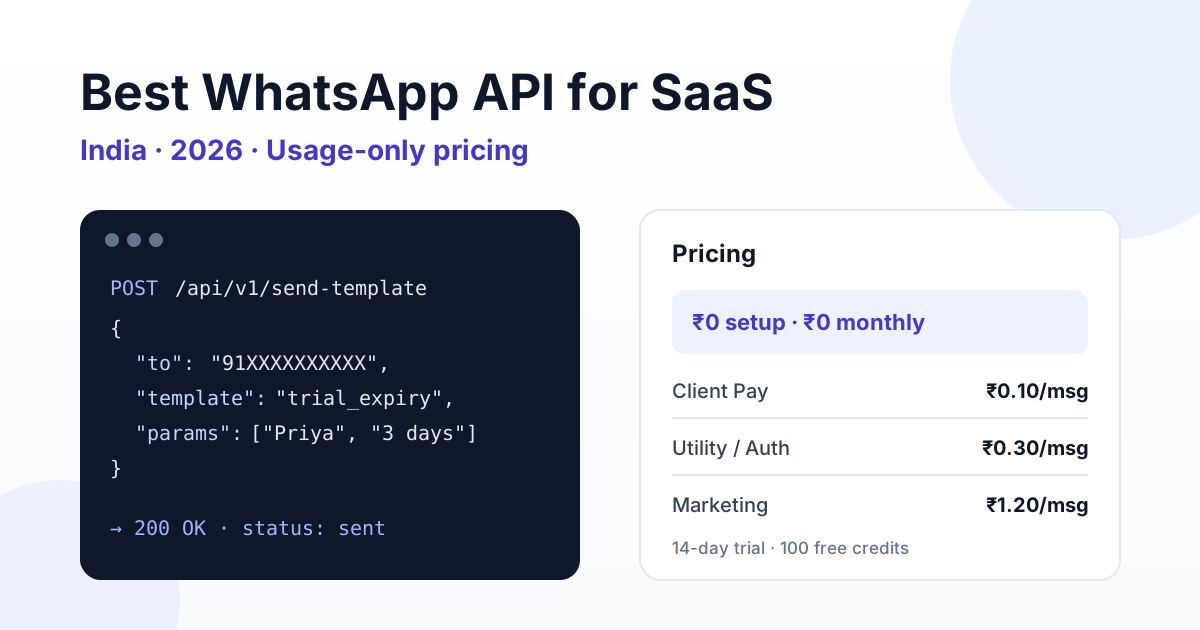
The best WhatsApp API setup for a SaaS company in India is usage-priced: Meta charges about ₹0.115 per utility or authentication (OTP) message and ₹0.8631 per marketing message, and a good provider adds a small per-message fee (₹0.10 on RichAutomate Client Pay) instead of a large monthly plan. You also need a documented REST API for sending templates and reading delivery status, webhooks, and, if you want to give WhatsApp to your own customers, a partner API to provision their accounts. For most Indian SaaS teams that means a usage-only provider such as RichAutomate rather than a flat monthly BSP plan or a from-scratch build on Meta Cloud API.
Disclosure: this guide is published by RichAutomate, one of the WhatsApp Business API platforms it discusses. Prices for Meta and other vendors were checked on their public pricing pages on 29–30 October 2026; vendors change rates, so confirm on their pricing page before you buy. All figures exclude 18% GST unless stated.
This guide is for founders, product managers and engineering leads at Indian SaaS companies deciding how to add WhatsApp to their product. We compare the three realistic paths, list the criteria that actually matter for a software business, show what a typical SaaS message mix costs, and explain how to embed WhatsApp for your own customers. If you are still comparing providers in general, start with our list of the best WhatsApp Business API providers in India.
Why SaaS companies need a different WhatsApp setup
A retailer uses WhatsApp for broadcasts and a support inbox. A SaaS company uses it as infrastructure. Messages are triggered by code: a sign-up fires an OTP, a trial on day 12 fires an expiry alert, a failed payment fires a dunning message, a usage threshold fires an upgrade nudge. That changes what you should look for.
- API first: every message is sent by your backend, so the API has to be the product, not an afterthought behind a dashboard.
- Predictable cost at variable volume: SaaS volume swings with sign-ups and product launches. Flat monthly plans charge you for capacity you may not use.
- Webhooks: your app needs delivery, read and reply events back in real time to update user state.
- Multi-tenancy: if your customers want WhatsApp inside your product, you need to provision numbers and credits for each of them.
- Template control via API: product teams ship new notifications weekly; creating and syncing templates should not require logging into a portal.
Three ways to add WhatsApp to a SaaS product
There are really only three paths. The right one depends on how much engineering time you want to spend on messaging plumbing versus your core product.
1. Build directly on Meta Cloud API
You create a Meta app, connect a WhatsApp Business Account and call the Graph API yourself. Maximum control and no intermediary fee, but you own everything else: template approval tracking, webhook signature checks, retries, media hosting, rate limits, billing reconciliation and a human inbox for replies. For a small team this can quietly become a second product.
2. Traditional BSP on a monthly plan
Many providers bundle a dashboard, inbox and API behind a monthly subscription. Good if you mainly need a team inbox and broadcasts. Check each provider's public pricing page carefully: monthly fees, per-message markups, user seats and API access tiers vary widely, and the API is sometimes limited to higher plans.
3. Usage-only provider with a public API
You pay only per message, with no setup or monthly fee, and get a REST API plus a dashboard and inbox. This is the model RichAutomate uses. It suits SaaS companies because cost tracks actual product usage, and you can start in a trial without a budget approval.
For a deeper look at the onboarding side, see our comparison of Embedded Signup versus a BSP for SaaS.
Comparison: what matters for a SaaS company
| Criteria | Direct Meta Cloud API | Monthly-plan BSP | RichAutomate (usage-only) |
|---|---|---|---|
| Setup and monthly fee | None from Meta; your engineering time | Varies: e.g. Wati Growth ₹2,699/mo, Interakt Growth ₹2,799/mo; check their pricing page | ₹0 setup; pay-as-you-go with no plan, or optional plans ₹499/₹899/₹1,199 a month |
| Per-message cost | Meta rates only | Varies; often Meta rate plus markup | Client Pay: ₹0.10/msg + Meta direct (≈₹0.96 marketing, ≈₹0.215 utility/auth). SaaS Pay: ₹1.50 marketing, ₹0.50 utility/auth |
| Send templates via REST API | Yes, you build the wrapper | Usually, sometimes plan-gated | Yes: send-template, send-message, send-campaign |
| Template create and sync via API | Yes, via Graph API | Varies | Yes: list, create, sync, delete |
| Delivery status and conversations via API | Webhooks only; you store state | Varies | Yes: message status, conversations and messages endpoints |
| Balance and usage via API | Meta billing only | Rarely | Yes: balance and usage endpoints |
| Provision your own customers | You build it | Some offer partner programmes | Partner API: create tenants, credits, API keys, status |
| Team inbox and flow builder | You build it | Usually included | Included |
| Time to first message | Days to weeks | Hours to days | Same day in the trial |
The pattern is clear: going direct saves the intermediary fee but costs engineering time, and monthly plans charge for capacity before you know your volume. A usage-only provider removes both costs at the start.
Want to see it working with your own product events? Start a 14-day trial with 100 free credits and send your first API template today, with ₹0 setup.
What a SaaS message mix actually costs
SaaS WhatsApp traffic is mostly transactional. A typical month for a B2B SaaS with 2,000 new sign-ups might look like this on SaaS Pay:
Get the India 2026 WhatsApp BSP price comparison
Wati vs AiSensy vs Interakt vs RichAutomate: Meta rates, platform fees and hidden costs, side by side. We send it to your WhatsApp in a minute.
| Use case | Category | Messages/month | RichAutomate SaaS Pay fee |
|---|---|---|---|
| Sign-up and login OTP | Authentication | 4,000 | 4,000 × ₹0.50 = ₹2,000 |
| Onboarding steps and trial-expiry alerts | Utility | 6,000 | 6,000 × ₹0.50 = ₹3,000 |
| Invoices, payment failures, usage alerts | Utility | 2,000 | 2,000 × ₹0.50 = ₹1,000 |
| Upgrade offers and feature launches | Marketing | 1,000 | 1,000 × ₹1.50 = ₹1,500 |
| Total | 13,000 | ₹7,500 |
On Client Pay the same 13,000 messages cost ₹1,300 in RichAutomate platform fees, with Meta billing you directly for its own per-message rates.
Worked bill: the same 13,000 messages on Client Pay and on other providers
| Line | Calculation | Amount before GST |
|---|---|---|
| Meta: authentication | 4,000 × ₹0.115 | ₹460 |
| Meta: utility | 8,000 × ₹0.115 | ₹920 |
| Meta: marketing | 1,000 × ₹0.8631 | ₹863.10 |
| RichAutomate Client Pay fee | 13,000 × ₹0.10 | ₹1,300 |
| RichAutomate Client Pay total | ₹3,543.10 | |
| Gupshup self-serve, for comparison | ₹2,243.10 Meta + 13,000 × ~₹0.088 (US$0.001) | ≈ ₹3,387 |
| MSG91, for comparison | ₹2,243.10 Meta at cost + ₹500 a month | ≈ ₹2,743 |
Honestly, at this volume a developer-first gateway such as MSG91 or Gupshup self-serve can be cheaper than RichAutomate Client Pay, because their fee is a flat or smaller per-message charge. What you trade for that saving is the product layer: RichAutomate includes the team inbox, flow builder, template API, balance and usage endpoints and the partner API for provisioning your own customers. If you only need a pipe for OTPs, a gateway may be enough; if your support and success teams also live in WhatsApp, compare total cost including the inbox you would otherwise buy. Which model is cheaper depends on your mix; our guide to Client Pay versus SaaS Pay billing walks through the break-even. Plug your own numbers into the WABA cost calculator and check current Meta rates before you budget.
Two cost levers matter most for SaaS. Keep product notifications strictly transactional so they stay in utility and authentication, and reply inside a user-initiated 24-hour window, where each number gets 1,000 free service replies a month before Meta charges the ₹0.115 utility rate. Note that since 1 October 2026 utility templates sent inside an open window are billed too, so a free-form reply is cheaper than re-sending a template. Our breakdown of WhatsApp OTP authentication template cost covers the OTP side in detail.
Embedding WhatsApp for your own customers
Many Indian SaaS products, from CRMs and clinic software to school ERPs and logistics tools, now get asked: "Can we send WhatsApp from inside your app?" You have two options: send everything from your own number, or let each customer connect theirs.
Sending from your number is simple but wrong for most B2B cases: your customer's end users want to hear from the clinic or the school, not from your software brand. The better model is one WhatsApp number per customer, provisioned by your backend. RichAutomate's partner API is built for this. An approved partner key can:
- Create a tenant account for each of your customers.
- Allocate or top up message credits per tenant.
- Issue and rotate API keys scoped to that tenant.
- Read and change tenant status when a customer churns or pauses.
Your SaaS then calls the normal send endpoints with each customer's key, and every message goes out from that customer's own verified number. See the API documentation for endpoints and the partner programme for access.
Implementation checklist for a SaaS team
- Map events to templates: list every product event that should trigger WhatsApp and assign a category: authentication, utility or marketing.
- Get templates approved early: create them through the API, keep utility copy free of promotional language, and use variables for names, plan names and dates.
- Wire webhooks: receive delivery, read and reply events and write them to your user timeline. Our webhook setup guide covers signature checks and retries.
- Collect opt-in: add a clear WhatsApp consent checkbox at sign-up and store the timestamp.
- Use idempotency: send an
Idempotency-Keyheader with each request so a retried job never sends the same OTP twice. - Watch balance: poll the balance endpoint before large runs so a campaign never stalls halfway.
- Measure outcomes: track trial-to-paid conversion for users who got WhatsApp nudges versus email only. Our playbook on B2B SaaS trial conversion on WhatsApp shows what to test.
One caution that applies to every provider: nobody can guarantee a number will never be restricted. Quality ratings depend on messaging users who opted in, keeping content relevant, and honouring opt-outs immediately.
Our recommendation
If you are an early or growth-stage Indian SaaS company, start usage-only. You avoid a monthly commitment while volume is unknown, you get a REST API and webhooks on day one, and you can offer WhatsApp to your own customers through the partner API when they ask. Revisit a direct Meta Cloud API build only when volume is high enough that the per-message platform fee outweighs the engineering cost of running messaging infrastructure yourself.
Compare the full model on our pricing page, or start your 14-day free trial with 100 credits and ₹0 setup, and ship your first WhatsApp notification from your product this week.
Leaving a developer gateway for a full platform? See our Gupshup alternative for India page.
More pricing guides: the cheapest WhatsApp Business API in India pillar, our side-by-side WhatsApp API pricing comparison for India 2026, the RichAutomate pricing page, or start a 14-day free trial with 100 credits.